Literacy Word Generator for Counties, Names, and Words By Number of Letters
Using the Literacy Omni-Tool for Vocabulary, Geography, and Inclusion
I developed the Classroom Word Engine (the tool located below) to address the challenge of finding the right word for your lesson. It is designed to generate extensive, categorized lists of words, names, and places, filtered strictly by letter count. This allows you to tailor your resources instantly, providing accessible entry points for SEN learners and rigorous challenges for greater depth students.
Word List
Word of the Day
Countries
Names
Number of Letters:
Select a tool tab and letter count, then hit Generate!
The Pedagogy of Word Length
Why do we filter by the number of letters?
In the early stages of reading acquisition, length is a reliable proxy for difficulty. A child mastering their CVC (Consonant-Vowel-Consonant) blends needs a reliable source of 3-letter words or 4-letter words that follow predictable patterns.
Conversely, when we are pushing for greater descriptive power in Key Stage 2, we often encourage students to move beyond monosyllabic descriptors. By generating words with 7 letters or more, we force them to consider suffixes like -ous, -ful, or -ing, which naturally elevate the sophistication of their writing.
The tool above provides massive lists of words to support this scaffolding. Rather than relying on memory, you can instantly populate a whiteboard with vocabulary that fits the specific orthographic constraints of your lesson.
Routine and Retrieval: The “Word of the Day”
Establishing a strong start to the school day is crucial for behaviour management and mindset.
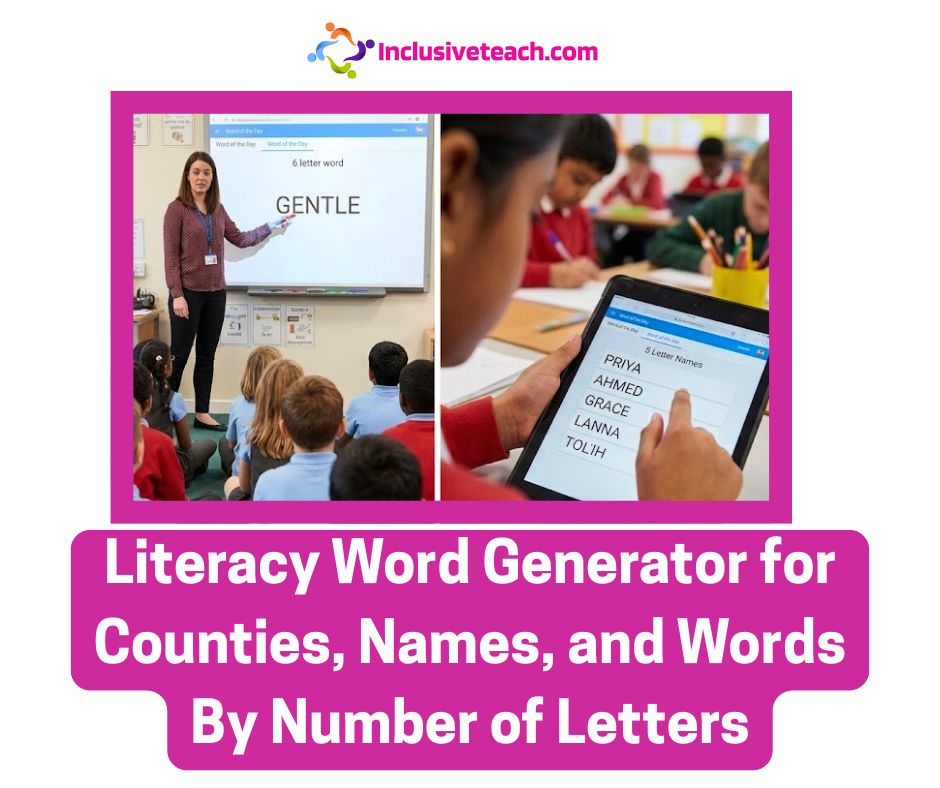
The Word of the Day function in the tool is designed to support daily routine and vocabulary extension. By selecting a specific letter count—perhaps correlating to the date or a maths number bond, you can present a fresh challenge every morning.
For example, selecting a 6-letter word might reveal “GENTLE” or “SUDDEN.”
The pedagogical value lies in the routine. You might ask the class to:
- Define the word using a dictionary.
- Identify the word class (is it a noun, verb, or adjective?).
- Use it in a complex sentence.
This creates a low-stakes, high-engagement starter that requires zero preparation time but delivers significant literacy value. It expands the semantic network of the classroom, introducing words that students might not encounter in their reading books.
Cross-Curricular Literacy: The Geography Filter
Spelling in geography is a frequent stumbling block. Students who can write complex narratives often struggle to visualize the spelling of place names.
The Countries tab within the tool allows for targeted retrieval practice. If you are studying South America, or simply working on general knowledge, you can generate lists of countries by number of letters.
This is particularly useful for setting constraints in poetry or acrostic puzzles, or for “Hangman” style starter activities where the length of the word is the primary clue. Finding a 4-letter country (like Peru, Iran, or Cuba) encourages students to mentally scan their geographical knowledge map, reinforcing retention through retrieval practice.
Inclusivity and Representation: The Name Generator
One of the most significant updates to this tool is the expansion of the Names database.
For too long, standard teaching resources have relied on a very narrow, anglocentric set of names. When we ask children to write a story, and the only examples we provide are “Tom,” “Ben,” and “Alice,” we subtly reinforce a limited view of the world.
The Names by number of letters function now draws from a diverse dataset of over 150 names, covering South Asian, East Asian, African, Middle Eastern, Hispanic, and European origins.
When you need 5-letter names for a maths word problem or a creative writing prompt, the tool will provide a mix such as Priya, Ahmed, Grace, and Diego. This ensures that the resources we put in front of our children reflect the diverse reality of modern classrooms. It allows every child the opportunity to see a name like theirs on the board, which is a small but powerful step towards belonging.

Application in Special Educational Needs (SEN)
As a special needs teacher, I find clear, rigid constraints are often comforting for autistic learners. Open-ended tasks (“Write a story about a dog”) can cause anxiety due to the sheer number of possibilities.
Using this tool to set specific constraints can reduce that anxiety.
The “Attention Autism” Approach:
For a Stage 3 (Turn Taking) activity, the tool acts as a highly visual, immediate prompt generator.
- The Constraint: “We are looking for 5-letter words.”
- The Visual: The list appears instantly on the interactive whiteboard.
- The Action: The student chooses one word from the list to act out or draw.
Because the tool generates the list, it removes the pressure from the child to “think of a word” from scratch. The scaffolding is built in. The list is huge, so the choice is genuine, but the boundaries are safe.
How to Integrate This into Planning
This tool is designed to be a “tab open” resource, something that sits in the background of your browser, ready for those moments when you need a specific resource immediately.
- Phonics: Rapidly generate lists of 3-letter words for decoding practice.
- Spelling: Create word searches or anagrams using 8-letter words for your higher achievers.
- Creative Writing: Use the Word of the Day as a mandatory inclusion in their story to force vocabulary adaptation.
By automating the generation of these lists, we buy back a few minutes of precious planning time. We ensure our vocabulary choices are varied, our names are inclusive, and our differentiation is precise.
Scroll up to the tool, select your category, and let the engine do the heavy lifting for you.
Related
Discover more from Special Education and Inclusive Learning
Subscribe to get the latest posts sent to your email.
Source link

You may also like

The Hidden Cost of Skipping Summer Math Tutoring
The Ultimate Guide to the -CK Word Family